
HTPC Problemas HTPC + AV ONKIO HT-R390 +PANASONIC G30

  • Iniciador del tema Iniciador del tema dtj19802
  • Fecha de inicio Fecha de inicio
Re: Problemas HTPC + AV ONKIO HT-R390 +PANASONIC G30

Imagen adjunta original

Independientemente de que sigáis por la configuración del XBMC, echa un vistazo a esto:

Número máximo de canales: 6

IMPORTANT - For HD audio to work then Max Number of Channels must be reported as 8 if anything other than 8 is reported then HD audio will not work even if DTS-HD and TrueHD are listed in the Encoded Formats box.

[URL="http://wiki.xbmc.org/index.php?title=Windows_Settings_for_AudioEngine"]Windows Settings for AudioEngine - XBMC[/URL] (en el step 5).

Hilo con el mismo problema y, curiosamente, receptor (Onkyo HT-R390, lo escribe mal en el primer post pero despues pone el nombre correcto):

You've misunderstood.

For HD audio to work then XBMC must see that the audio device can handle up to a maximum of 8 channels of audio, that does not mean all audio must have 8 channels just that the audio device must support that as a maximum, so 5.1 will work just fine.

If your device is only reporting 6 channels then you've probably got an EDID problem requiring an EDID override, this is a common issue for AMD GPU's.

To solve this you'll need to go to AVSForum for support, the 2 threads are:

EDID Overrides to solve bitstreaming issues for ATI 5xxx's
EDID Override Thread

Tulli is the expert on these matters over there.

Y la solución fue, efectivamente, un EDID override por lo visto:

I only want to say thanks to jjd-uk, tungmeister and all the people that read this. I solve my problem with EDID and, finally, I can play HDAudio content with XBMC

Thanks!!!! XDDDD

http://forum.xbmc.org/showthread.php?tid=170693

Estas cosas a veces se solucionan con una actualización de drivers, pero como la fecha del post es de agosto de este año me ha parecido interesante comentarlo no vaya a ser que el problema sea ese y os volváis locos con la configuración del audio sin encontrar solución.

Suerte.
 
Re: Problemas HTPC + AV ONKIO HT-R390 +PANASONIC G30

Imagen adjunta original

Independientemente de que sigáis por la configuración del XBMC, echa un vistazo a esto:

Número máximo de canales: 6


[URL="http://wiki.xbmc.org/index.php?title=Windows_Settings_for_AudioEngine"]Windows Settings for AudioEngine - XBMC[/URL] (en el step 5).

Hilo con el mismo problema y, curiosamente, receptor (Onkyo HT-R390, lo escribe mal en el primer post pero despues pone el nombre correcto):


Y la solución fue, efectivamente, un EDID override por lo visto:


http://forum.xbmc.org/showthread.php?tid=170693

Estas cosas a veces se solucionan con una actualización de drivers, pero como la fecha del post es de agosto de este año me ha parecido interesante comentarlo no vaya a ser que el problema sea ese y os volváis locos con la configuración del audio sin encontrar solución.

Suerte.
Hola buenas noches y muchas gracias por el aporte,,, me has dado la pista y creo que mi problema va por ahí por los famosos EDID, he estado leyendo e intentando enterarme de que es exactamente y que tengo que hacer para solucionarlo, peo no me queda muy claro y mira que he leído y releído todo lo que he visto (que por desgracia está en inglés y el mio no es para tirar cohetes..).
Por lo que he visto me he descargado un archivo .inf que esta en el hilo que me has puesto que es de una tv Panasonic y un AV 390 que es el mio he conseguido instalarlo no sin esfuerzo porque no tiene la firma digital y w8 es muy pesado, pero una vez que me dice que se ha instalado correctamente sigo exactamente igual no he notado ni he visto ningún cambio sigo con mis 6 canales en lugar de 8. :(
Alguien sabe decirme como puedo cambiar el famoso EDID paso a paso???
Muchas gracias.
 
Re: Problemas HTPC + AV ONKIO HT-R390 +PANASONIC G30

Yo capturaría los EDID de la TV y AVR y crearía los .inf para que los vea Tulli y te cree uno personalizado. De todos modos, ya que has metido ese comprueba que después de reiniciar el ordenador y apagar TV y AVR y una vez encendidos (así forzamos un EDID handshake con el nuevo controlador) no te aparece como controlador el de monitor genérico y si el overrride. Insiste mucho en ese post en reiniciar después de instalar el .inf override. Si te aparece el override y sigues con 6 canales desinstálalo.

Voy a seguir lo que pone en ese hilo de avsforum EDID Overrides to solve bitstreaming issues for ATI 5xxx's.

4. UNINSTALLING THE OVERRIDE.

Go to Device Manager
Monitors[Expand]
Right-click on the override
Select uninstall
Tick on "Delete the driver software for this device"
OK
Reboot

Es decir, que en el administrador de dispositivos, en monitores hagas click-derecho sobre el overrride y elijas desinstalar, activando la casilla de "Borrar el controlador ..." y reinicia para que enganche el driver generico que había antes.

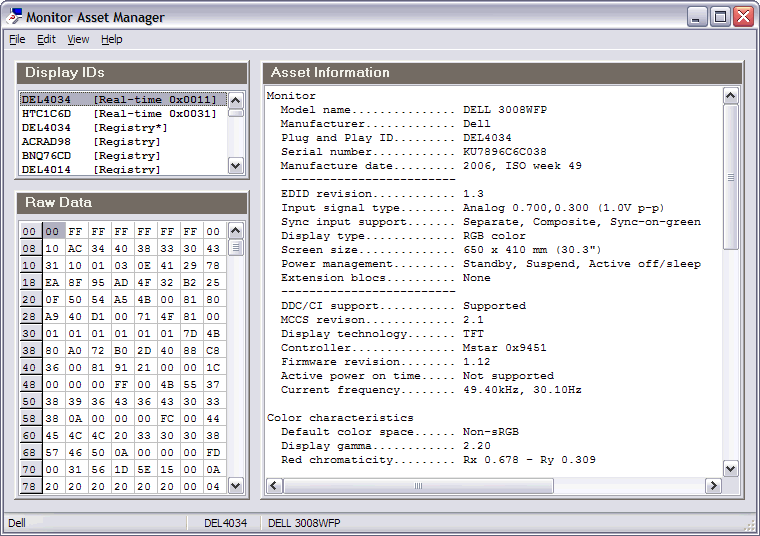
Para capturar los EDID de TV y AVR bájate el moninfo EnTech Taiwan | Utilities | Monitor Asset Manager e instalalo.

1. EDID CAPTURE
(the full REAL-TIME (no registry entries) 256-byte EDIDs are required)
If UAC is active Moninfo must be run as administrator.

Here's the procedure for connecting and capturing the full 256-byte EDID.

Display Device EDID Capture
Connect the graphic card HDMI to your display device HDMI.
IF using Moninfo THEN
Launch Moninfo
"[Real time ...]" entry on top left "Display IDs" window [Select]
File [Select]
Create INF [Select]
SAVE TO [Your display device name].inf. (e.g. Samsung LN-S4095D.inf)

AVR/AVP EDID Capture
Connect the graphic card HDMI to your AVR/AVP HDMI.
[Optionally] Connect the AVR HDMI port to the display device HDMI-out.
IF using Moninfo THEN
Launch Moninfo
"[Real time ...]" entry on top left "Display IDs" window [Select]
File [Select]
Create INF [Select]
SAVE TO [Your display AVR/AVP name].inf. (e.g. DENON AVR988.inf)

moninfo2.gif


Viene a decir que conectes el HDMI del HTPC directamente a la TV, abras el moninfo como administrador, en Displays ID te pongas sobre el de la TV y que ponga real time (importante esto) (como el Dell de la captura). Una vez activo el de la TV te vas a File -> Create INF y le pones el nombre de tu TV y guardas. Igual con el AVR, conectas el HDMI del HTPC al AVR, abres moninfo, etc.

Con esto tienes dos .inf con el nombre de tu TV y AVR que es lo que necesita Tulli para crear el .inf personalizado.

Escríbele en ese mismo hilo y le pones tu TV (Display), AVR, sistema operativo (OS), reproductor XBMC y le pones la captura esa en la que pone que solo tienes 6 canales como máximo, explicándole que no puedes hacer bitstreaming de DTS DH. Adjunta los dos .inf en un zip. Post ejemplo:

Hello joined the forum just for this problem. I have a problem playing DTS-HD files. My Max Number of Channels in sound setting only goes up to 6, I get stuttering of DTS-HD files in XBMC. I have tried all the settings from the XBMC forums and suggestions from forum members and the last case scenario was suggested to override the EDID to make XBMC and Windows recognize 8 channel capability.

My setup

GPU - Sapphire HD6450 512mb
HDTV - Sony KDL-40EX403
AVR - Onkyo HT-R380

As the guide states (using Moninfo) -

- I connected my GPU to my TV and created the INF to get the TV info

- then I connected the GPU to the AVR (normal setup) and created the INF to get the AVR info

Here are the files

Onkyo HT-R380 and Sony KDL-40EX403.zip (3k. zip file)

Thanks

Tulli le responde con el .inf personalizado:
Sony KDL-40EX403 - ONKYO HT-R380.zip 1k .zip file

Problema resuelto:
Thank you! Fixed my problem!

EDID Overrides to solve bitstreaming issues for ATI 5xxx's - Page 116

Si Tulli te crea uno porque vea algún error lo instalas:

2. INSTALLATION

Easy Method
Go to Start
Computer [Right-click]
Properties [Select]
Device Manager [Select]
Monitors[Expand]
Monitor ID [Righ-Click] (usually "Generic PnP Monitor")
Properties [Select]
Driver tab [Select]
Update Driver button [Select].
Make sure that the .inf driver is the ONLY one in its dir
Browse my computer for driver software [Select]
Let me pick from a list of device drivers on my computer [Select]
Have Disk [Select]
Browse to the directory where .inf driver is located.
Click on .inf file and then on the Open button
OK [Select]
Next [ Select]
Confirm installation if necessary ([Windows Security] Install this driver software anyway)
Close [Select]
REBOOT

Importante lo de reinciar. Para el tema de W8 echa un vistazo a esto:

Finally got it working. For anyone else trying to get one of these overrides going in Windows 8, you must disable signature enforcement before it will allow you to click through ("install anyways") on the inf install.

To do so:
From the Metro Start Screen, open Settings (move your mouse to the bottom-right-corner of the screen and wait for the pop-out bar to appear, then click the Gear icon).
Click ‘More PC Settings’.
Click ‘General’.
Scroll down, and click ‘Restart now’ under ‘Advanced startup’.
Wait a bit.
Click ‘Troubleshoot’.
Click ‘Advanced Options’
Click ‘Windows Startup Settings’
Click Restart.
You'll eventually get the option to disable driver sig check. Install the inf, then reboot normally, the mod should stick.

BTW, Tulli, if you're ever around Toronto, Canada, I owe you a beer.

- MrN

EDID Overrides to solve bitstreaming issues for ATI 5xxx's - Page 109

Es mejor así (que te lo mire Tulli) porque puede ser que tu EDID esté bien y sea un problema de driver gráfica, configuración AVR, etc. y él te dirá por donde pueden ir los tiros. Tiene toda la pinta de que te faltan data blocks y él te los agregará del .inf del AVR al .inf de la TV y cuando lo instales problema resuelto. Suerte.
 
Re: Problemas HTPC + AV ONKIO HT-R390 +PANASONIC G30

;)Hola y muy buenas tardes a todos, en primer lugar daros a todos las gracias por vuestra ayuda y por vuestros consejos especialmente a ti Delfin ya que te has tomado muchas molestias en intentar ayudarme (y lo has hecho y mucho). y segundo deciros que por fin lo he conseguido ya he solucionado el problema y efectivamente todo venía por el dichoso EDID y que w8 reconocía mi monitor como predeterminado y por eso me reconocía solo 6 Canales en lugar de los 8 necesarios. El problema está que el dichoso w8 cuando instalaba el EDID que vi en el hilo que me pusiste lo instalaba pero no lo activaba al no estar firmado digitalmente y seguía apareciéndome monitor predeterminado con lo que desinstale el predeterminado e instale manualmente el EDID override... reinicie y se hizo la magía automáticamente mis 6 canales pasaron a 8 y mis tres reproductores empezarons a sonar "como los angeles" cualquier archivo dts-hd True Hd me lo reproduce perfectamente sin ningún problema con el consiguiente "Letrerito en el Display de Av", ahora solo falta ver si realmente hay diferencia y ha merecido la pena, aunque sinceramente solo por la de cosas que he aprendido y por lo que me habéis ayudado aunque no haya diferencia ha merecido la pena.....
En cuanto pueda subiré alguna captura del correcto funcionamiento.... Muchisimas gracias

Lo prometido es deuda....:juas ;D 8-)
 

Archivos adjuntos

  • 20131026_104821-1-1.jpg
    20131026_104821-1-1.jpg
    841,9 KB · Visitas: 13
  • 20131026_104512-1.jpg
    20131026_104512-1.jpg
    2 MB · Visitas: 14
Re: Problemas HTPC + AV ONKIO HT-R390 +PANASONIC G30

Me alegro dtj19802, ahora a disfrutar XD.
 
Atrás
Arriba